
RAG vs AI Agents: Which AI Architecture Does Your Business Need?
Businesses are moving beyond basic AI chatbots.
Today, companies are building AI systems that can answer questions from internal knowledge bases, analyze documents, interact with APIs, update business systems, automate workflows, and assist employees with complex tasks.
Two architectures frequently appear in these discussions:
Retrieval-Augmented Generation (RAG) and AI Agents.
They are related, but they solve different problems.
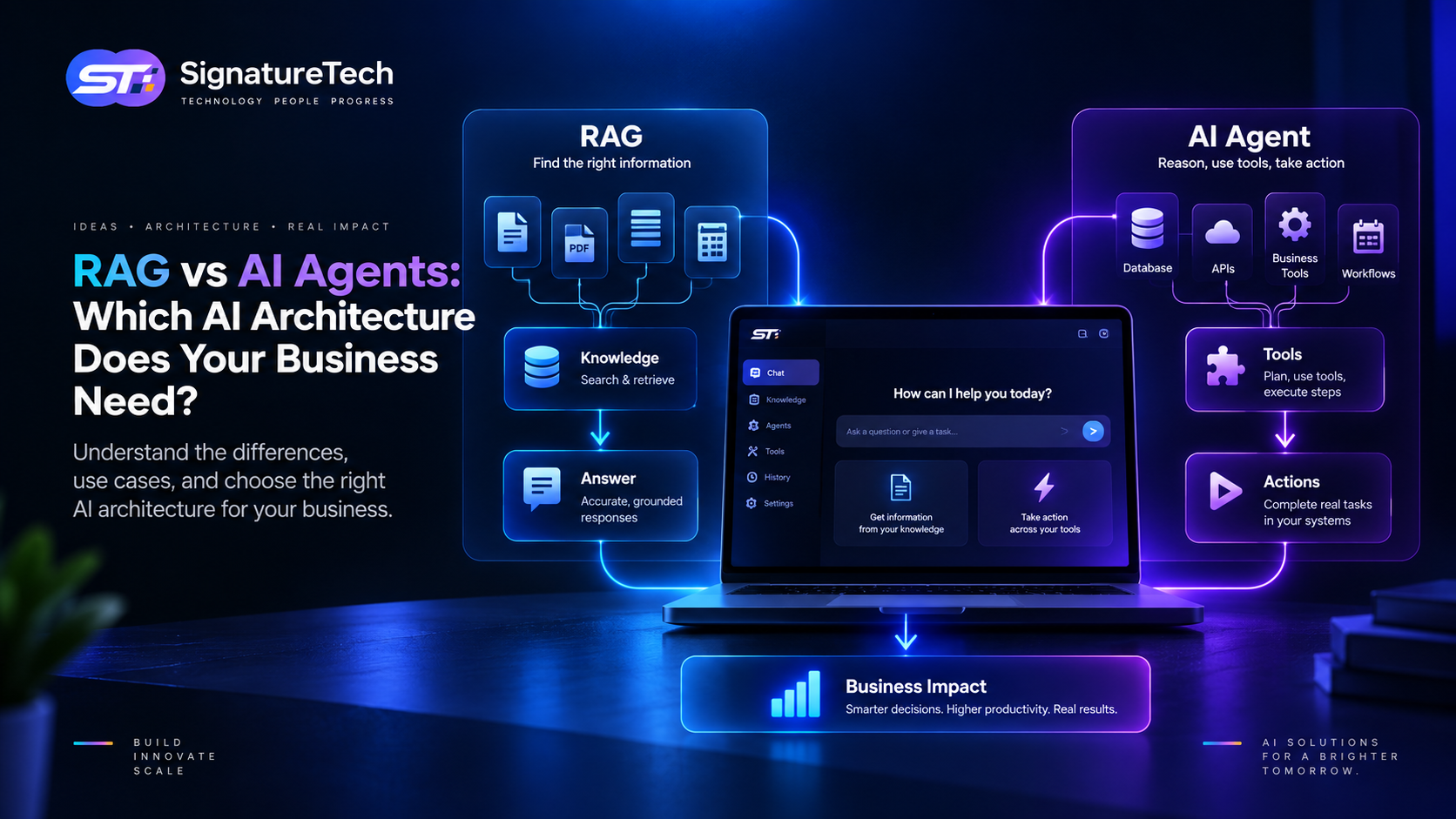
RAG primarily helps an AI model find and use relevant information.
AI agents go further by allowing an AI system to reason about a task, use tools, make decisions, and execute multiple steps.
Choosing between them isn't simply a matter of selecting the newer technology.
The right question is:
Does your application primarily need better access to information, or does it need to take actions?
What Is RAG?
RAG stands for Retrieval-Augmented Generation.
The basic idea is straightforward:
Instead of asking an AI model to answer entirely from its existing knowledge, the application retrieves relevant information from an external knowledge source and provides that information to the model as context.
A simplified workflow looks like this:
User Question
      ↓
Query Processing
      ↓
Search Knowledge Base
      ↓
Retrieve Relevant Content
      ↓
LLM
      ↓
Generated Answer
For example, imagine a company has thousands of:
- Product documents
- HR policies
- Support articles
- Technical manuals
- Contracts
- Internal documentation
An employee asks:
"What is our policy for carrying forward annual leave?"
A RAG system can search the company's authorized documents, retrieve the relevant policy, and provide that information to the language model to generate an answer.
The model doesn't need to memorize the company's entire knowledge base.
It retrieves the information when it is needed.
Why Businesses Use RAG
RAG is particularly useful when AI needs access to private, frequently changing, or domain-specific information.
Common examples include:
Internal Knowledge Assistant
Employees can ask questions about company policies, processes, and documentation.
Customer Support
AI can retrieve relevant product documentation before answering customer questions.
Legal Document Search
Users can ask questions about contracts or policy documents.
Technical Support
Developers can query documentation, manuals, and troubleshooting guides.
Enterprise Search
Employees can search across authorized business information using natural language.
The common pattern is:
Find information → Understand information → Generate response
What Is an AI Agent?
An AI agent is a more action-oriented system.
Instead of simply generating an answer, an agent can determine what steps are necessary to complete a task and use available tools to perform those steps.
A simplified architecture looks like:
User Request
      ↓
Agent
      ↓
Reason / Plan
      ↓
Choose Tool
      ↓
Execute Action
      ↓
Observe Result
      ↓
Next Action
      ↓
Final Result
For example, consider:
"Find customers whose subscriptions expire this week and prepare follow-up emails."
An agent could potentially:
- Query the CRM.
- Identify relevant customers.
- Check subscription information.
- Segment customers.
- Generate personalized messages.
- Present the messages for approval.
- Send approved messages.
That is fundamentally different from simply answering a question.
RAG vs AI Agents
The easiest way to understand the difference is to compare their primary purpose.
| Capability | RAG | AI Agent |
|---|---|---|
| Retrieve information | Excellent | Excellent |
| Answer questions | Excellent | Excellent |
| Search documents | Excellent | Excellent |
| Use external tools | Limited | Core capability |
| Execute workflows | Limited | Strong |
| Make multi-step decisions | Limited | Strong |
| Call APIs | Possible | Core capability |
| Update business systems | Usually no | Yes |
| Human approval | Possible | Common |
| Workflow automation | Limited | Strong |
RAG is primarily about knowledge retrieval.
Agents are primarily about reasoning and action.
The Important Part: They Are Not Competitors
One of the biggest misconceptions is treating RAG and AI agents as alternatives.
In many production systems, you use both.
For example:
                    AI AGENT
                       │
          ┌────────────┼────────────┐
          ↓            ↓            ↓
       RAG Search     CRM API    Email API
          │            │            │
          ↓            ↓            ↓
    Company Docs    Customer     Communication
                    Data
The agent determines what needs to happen.
RAG provides the information required to make the decision.
APIs provide the ability to take action.
This combination can produce much more capable business applications.
Example: Customer Support
Let's compare three approaches.
Traditional Chatbot
Customer
   ↓
LLM
   ↓
Answer
The model may not have access to the latest company information.
RAG-Based Support
Customer
   ↓
Question
   ↓
Knowledge Search
   ↓
Relevant Documentation
   ↓
LLM
   ↓
Answer
This is much better for questions about:
- Product documentation
- Policies
- Features
- Troubleshooting
- FAQs
Agent-Based Support
Now consider:
"My payment failed. Can you check what happened and help me fix it?"
The system might need to:
- Identify the customer.
- Check payment status.
- Retrieve account information.
- Search troubleshooting documentation.
- Determine the likely issue.
- Recommend an action.
- Potentially initiate a retry or create a support ticket.
This requires more than retrieval.
It requires tool usage and workflow execution.
When RAG Is the Better Choice
Choose RAG when the primary requirement is:
"Help the AI answer questions using our information."
Good examples include:
- Knowledge bases
- Documentation assistants
- HR policy assistants
- Customer support
- Product search
- Internal company search
- Document Q&A
- Research assistants
If the application doesn't need to perform actions, starting with an agent may add unnecessary complexity.
When AI Agents Are the Better Choice
Agents make more sense when the requirement is:
"Help the AI complete a task using multiple systems or tools."
Examples include:
- CRM automation
- Sales operations
- Customer onboarding
- IT support
- Business workflow automation
- Research workflows
- Data analysis
- Scheduling
- Ticket management
- Operations automation
The key characteristic is action.
When You Need Both
Many serious enterprise applications eventually need both.
Consider an HR assistant.
An employee asks:
"Can I take leave next Friday?"
The system might need to:
RAG
Retrieve the company's leave policy.
Database
Check the employee's available leave balance.
Agent
Determine the appropriate workflow.
HRMS API
Create the leave request.
Approval Workflow
Send it to the employee's manager.
The architecture could look like:
Employee
   ↓
AI Interface
   ↓
Agent
 ┌─┴───────────────┐
 ↓                 ↓
RAG              HRMS API
 ↓                 ↓
Policy          Leave Balance
                   ↓
             Create Request
                   ↓
               Approval
This is where AI becomes part of the actual business application rather than simply a chat interface.
RAG Architecture
A typical RAG system contains several components.
Documents
    ↓
Parsing
    ↓
Chunking
    ↓
Embeddings
    ↓
Vector Database
    ↓
Retriever
    ↓
LLM
    ↓
Response
The quality of the final response depends heavily on the retrieval pipeline.
Simply adding a vector database doesn't automatically create a good RAG system.
You need to consider:
- Document quality
- Chunking strategy
- Metadata
- Embedding model
- Retrieval strategy
- Re-ranking
- Access control
- Context limits
- Citation/traceability
- Evaluation
AI Agent Architecture
A typical agent system might look like:
User
 ↓
Agent
 ↓
Planning / Reasoning
 ↓
Tool Selection
 ├── Database
 ├── Search
 ├── RAG
 ├── CRM
 ├── Email
 ├── Payment API
 └── Internal APIs
 ↓
Tool Results
 ↓
Agent
 ↓
Decision / Next Action
 ↓
Final Result
The agent effectively becomes an orchestration layer between the user and business systems.
This makes the architecture much more powerful—but also introduces more engineering challenges.
The Cost Difference
RAG can often be simpler and cheaper to operate than a sophisticated agent.
A basic RAG system may require:
- Document storage
- Embeddings
- Vector search
- LLM calls
An advanced agent can additionally require:
- Multiple model calls
- Tool execution
- Workflow orchestration
- State management
- Retries
- Error handling
- Permissions
- Observability
- Human approval
- Evaluation
Therefore, don't build an agent simply because you can.
If RAG solves the problem, RAG may be the better engineering decision.
Security Is Different Too
Security becomes particularly important when agents can take actions.
A RAG application might primarily have access to documents.
An agent could have permission to:
- Read customer information
- Update CRM records
- Send emails
- Create tickets
- Modify orders
- Schedule meetings
- Call internal APIs
That means the agent needs carefully controlled permissions.
A useful principle is:
Give the agent the minimum permissions required to complete its job.
For high-impact operations, introduce human approval.
For example:
Agent
  ↓
Prepare Refund
  ↓
Human Approval
  ↓
Payment API
rather than:
Agent
  ↓
Automatically Refund Customer
for every situation.
RAG Security: Don't Forget Authorization
RAG systems have their own security challenge.
Imagine an organization has:
Public Documents
Internal Documents
Finance Documents
HR Documents
Executive Documents
A user asking a question should only retrieve documents they are authorized to access.
Otherwise, the AI could become an unintended data-exfiltration layer.
Access control therefore needs to happen before or during retrieval, not only in the user interface.
A secure RAG architecture should consider:
- Tenant isolation
- Document permissions
- User roles
- Metadata filtering
- Retrieval authorization
- Data encryption
- Audit logs
Common Mistake: Building an Agent Too Early
AI agents are exciting.
That can make them tempting to use everywhere.
But if your requirement is:
"Let employees search company documentation."
You probably don't need a complex autonomous agent.
A well-designed RAG system may be enough.
Similarly, if your requirement is:
"Automatically update our CRM after every qualified lead."
You may not need an autonomous agent either.
A deterministic workflow may be more reliable.
The architecture should follow the business requirement, not the popularity of the technology.
A Better Decision Framework
Ask these questions before selecting an architecture.
Question 1
Does the AI primarily need to retrieve information?
Yes → Consider RAG.
Question 2
Does the AI need to perform actions?
Yes → Consider an agent or workflow automation.
Question 3
Does the workflow involve multiple systems?
Yes → Agent orchestration may be useful.
Question 4
Does the AI need access to private business knowledge?
Yes → RAG may be required.
Question 5
Are the actions high-risk?
Yes → Add human approval and strong authorization controls.
A Practical Architecture for Businesses
For many modern SaaS applications, a hybrid architecture is likely to be the most useful.
                    USER
                      ↓
                AI INTERFACE
                      ↓
                 AI AGENT
                /    |    \
               /     |     \
             RAG    APIs   Workflows
              ↓      ↓       ↓
          Knowledge  CRM    Automation
          Base       DB     Systems
                \     |     /
                 \    |    /
                  BUSINESS
                   RESULT
Each component has a specific responsibility.
RAG
Provides knowledge.
Agent
Coordinates reasoning and actions.
APIs
Connect business systems.
Workflow Engine
Handles deterministic processes.
Human
Provides oversight where judgment or authorization matters.
This separation can make the overall system more reliable.
Don't Replace Deterministic Software With AI
There is another important principle.
If a process can be represented as:
IF payment_successful
THEN send_confirmation
there is usually little reason to ask an LLM to make that decision.
Use deterministic software where deterministic software is appropriate.
AI is valuable when the problem involves:
- Natural language
- Unstructured information
- Ambiguous requests
- Classification
- Reasoning
- Recommendations
- Complex task planning
The strongest systems combine both.
The Future: AI as an Application Layer
The most interesting shift isn't simply from chatbots to agents.
It's the emergence of an AI interaction layer over existing business software.
Instead of forcing users to navigate:
CRM
→ Reports
→ Customer
→ Subscription
→ Activity
they might ask:
"Which high-value customers haven't engaged with us in the last 30 days?"
The AI can retrieve the relevant data, analyze it, and present the result.
Then the user could ask:
"Prepare follow-up emails for them."
The system can transition from information retrieval to action.
That's where RAG, agents, APIs, and traditional software architecture start working together.
Final Thoughts
RAG and AI agents aren't competing technologies.
They solve different layers of the problem.
RAG helps AI access relevant knowledge.
Agents help AI reason through tasks and use tools.
For a simple knowledge assistant, RAG may be all you need.
For a workflow automation system, an agent may be more appropriate.
For a sophisticated enterprise application, the best architecture may combine:
RAG + AI Agents + APIs + Workflow Automation + Human Oversight
The most important decision isn't choosing the most advanced AI architecture.
It's choosing the simplest architecture that reliably solves the business problem.
At SignatureTech, we help businesses evaluate where AI actually adds value—whether that's a RAG-powered knowledge system, an AI agent, workflow automation, or a combination of AI with existing SaaS infrastructure.
Because the goal isn't to add AI everywhere.
The goal is to build software that makes the business work better.