
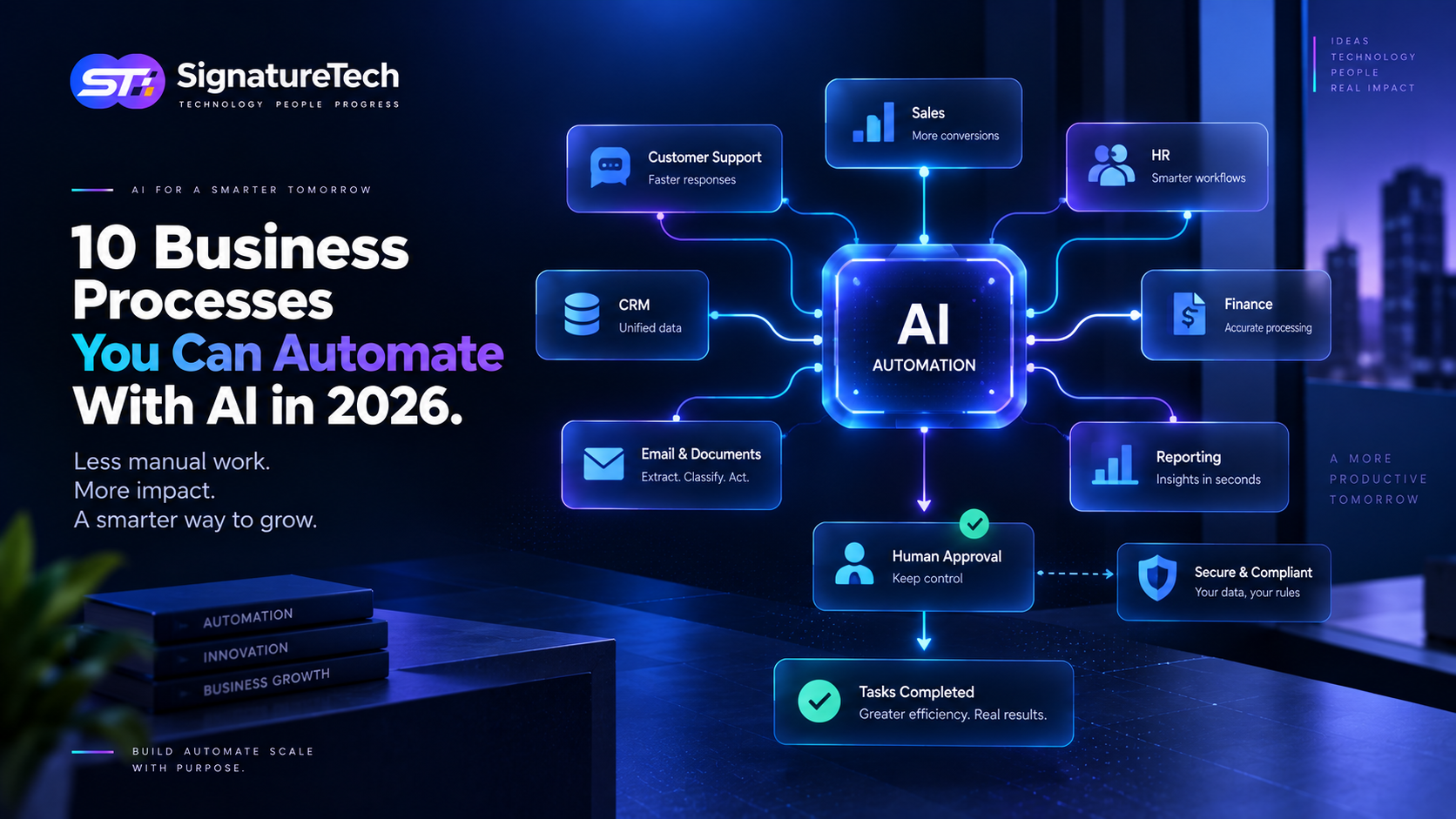
10 Business Processes You Can Automate With AI in 2026
Businesses have always looked for ways to reduce repetitive work.
Automation has traditionally handled predictable tasks such as sending emails, moving data between systems, generating notifications, and processing predefined workflows.
Artificial intelligence is expanding what automation can do.
Modern AI systems can understand natural language, classify information, summarize documents, extract data, make recommendations, and interact with software systems. When combined with traditional automation, this creates an opportunity to automate workflows that previously required significant human involvement.
But AI automation isn't about replacing every employee or putting an AI model into every business process.
The real opportunity is to identify repetitive workflows where AI can reduce manual effort while keeping people in control of important decisions.
Here are ten business processes worth considering in 2026.
1. Customer Support
Customer support is one of the strongest use cases for AI automation.
Support teams spend significant time answering repetitive questions such as:
- Where is my order?
- How do I reset my password?
- What is your refund policy?
- How do I change my subscription?
- How do I use a particular feature?
An AI-powered support system can understand customer questions, retrieve relevant information, and provide responses based on the company's knowledge base.
More advanced AI agents can also interact with business systems.
For example:
Customer question → Identify account → Check order → Determine status → Respond → Create ticket if necessary
This turns AI from a simple chatbot into a workflow assistant.
Where humans still matter
Complex complaints, refunds, sensitive issues, and exceptional cases should be escalated to human agents.
The goal is not to eliminate support teams.
It's to allow them to spend more time on problems that require judgment.
2. Lead Qualification
Sales teams often receive more leads than they can manually evaluate.
AI can help analyze incoming leads using information such as:
- Company
- Industry
- Job role
- Requirements
- Website information
- Previous interactions
- Engagement
- Estimated business potential
The system can then categorize leads:
High Priority
Medium Priority
Low Priority
It can also summarize why a lead received a particular score.
For example:
"Growing SaaS company, relevant technology requirements, decision-maker identified, and requested a product demonstration."
Sales representatives can then focus their attention on the most promising opportunities.
3. Email Processing
Employees spend a large amount of time reading and responding to emails.
Not every email requires the same level of attention.
AI can classify incoming messages into categories such as:
- Sales enquiry
- Customer support
- Invoice
- Partnership
- Meeting request
- Complaint
- Internal request
The system can then trigger the appropriate workflow.
For example:
Email received → Classify → Extract information → Update CRM → Draft response → Human approval → Send
For low-risk repetitive communications, some steps can potentially be automated completely.
4. Invoice and Document Processing
Finance and operations teams frequently process invoices, receipts, purchase orders, contracts, and other documents.
Traditional processing often requires employees to manually read documents and enter information into business software.
AI can extract information such as:
- Vendor
- Invoice number
- Date
- Tax
- Amount
- Payment terms
- Line items
The extracted information can then be validated against business rules and sent into the accounting workflow.
A typical workflow could be:
Document uploaded → AI extraction → Validation → Accounting system → Approval → Payment workflow
This can significantly reduce manual data entry.
5. Meeting Summaries and Follow-Ups
Meetings generate a lot of information that can easily get lost.
AI can process meeting transcripts and generate:
- Summary
- Decisions
- Action items
- Assigned responsibilities
- Deadlines
- Follow-up tasks
For example:
Meeting completed → Generate summary → Identify action items → Create tasks → Notify participants
This turns meeting information into actionable work instead of leaving it inside a transcript.
6. Employee and HR Workflows
HR teams handle many repetitive employee requests.
Examples include:
- Leave questions
- Policy questions
- Onboarding tasks
- Document requests
- Employee information
- Attendance queries
- HR ticket classification
An AI assistant connected to an HRMS can help employees find information without requiring HR staff to answer every routine question.
For example:
"How many leave days do I have?"
The system can retrieve the employee's authorized information and provide the answer.
For a more advanced workflow:
"Create a leave request for next Monday."
The system could validate the request and initiate the appropriate approval process.
7. Sales Follow-Ups
Following up with prospects is essential, but manually tracking every conversation can become difficult.
AI can analyze CRM activity and help sales teams identify:
- Leads requiring follow-up
- Prospects who haven't responded
- Opportunities becoming inactive
- Upcoming meetings
- Previous conversation context
It can then prepare a suggested follow-up message.
For example:
CRM activity → Analyze conversation → Determine next action → Draft message → Sales approval → Send
This keeps the salesperson involved while removing much of the administrative work.
8. Internal Reporting
Managers frequently need reports from multiple business systems.
Preparing these reports manually can involve:
- Exporting data
- Cleaning spreadsheets
- Running queries
- Creating charts
- Writing summaries
AI can simplify parts of this workflow.
A manager could ask:
"What were our top-performing products last month?"
An AI-powered reporting system could retrieve the relevant data, analyze it, and present the results in a readable format.
The important requirement is that the AI should work with trusted and authorized business data.
AI-generated reports should also be traceable back to the underlying information whenever possible.
9. Customer Onboarding
Customer onboarding often involves multiple manual steps.
For a SaaS business, the workflow might include:
- Customer signs up
- Account is created
- Welcome email is sent
- Customer information is collected
- Team members are invited
- Initial configuration is completed
- Training resources are recommended
- Follow-up is scheduled
AI can help personalize this process based on the customer's profile and behavior.
For example, an AI onboarding assistant might identify that a customer hasn't completed an important setup step and proactively guide them.
This can improve activation without requiring a customer success representative to manually monitor every account.
10. Business Data Analysis
One of the biggest opportunities for AI automation is making business data easier to understand.
Traditional business applications often require users to navigate through dashboards and reports.
AI can provide a natural-language interface to business information.
A business leader could ask:
"Why did sales decrease this month?"
The system could potentially analyze authorized data across:
- Sales
- Customers
- Products
- Regions
- Marketing
- Pricing
- Conversion rates
It can then surface patterns and provide a structured explanation.
This doesn't mean AI should make the final business decision.
Instead, it can reduce the time required to find and understand information.
AI Automation vs Traditional Automation
AI shouldn't replace traditional automation everywhere.
Consider this workflow:
When a customer completes payment → Send confirmation email.
There is no reason to introduce an AI model.
A deterministic automation is:
- Faster
- Cheaper
- More predictable
- Easier to test
AI becomes more useful when the workflow involves unstructured information or interpretation.
For example:
Read a customer email → Understand the problem → Determine the category → Search account information → Recommend the next action.
This is where AI can provide additional value.
A good architecture often combines both:
Traditional Automation + AI + Business Rules + Human Approval
What Should You Automate First?
Not every process is a good candidate for AI.
Start by looking for workflows with these characteristics:
High Volume
The process happens frequently.
Repetitive
Similar tasks are performed repeatedly.
Time Consuming
Employees spend meaningful time on the process.
Data Rich
The workflow has sufficient historical or operational data.
Clearly Defined
There is a reasonably consistent desired outcome.
Low to Moderate Risk
Errors won't create unacceptable consequences.
A simple scoring model can help prioritize opportunities.
| Factor | Low | High |
|---|---|---|
| Frequency | Rare | Daily / Continuous |
| Manual effort | Minimal | Significant |
| Business impact | Low | High |
| Data availability | Poor | Strong |
| Process consistency | Variable | Predictable |
| Automation potential | Low | High |
Start with workflows that score highly across several dimensions.
Don't Automate a Broken Process
This is one of the most important principles of business automation.
If a workflow is already confusing, inefficient, or poorly defined, adding AI doesn't necessarily fix it.
It can make the problem harder to understand.
Before implementing AI:
Map the existing workflow.
Identify:
- Inputs
- Decisions
- Actions
- Systems involved
- Human approvals
- Exceptions
- Outputs
Then determine where AI actually adds value.
Sometimes the best solution isn't an AI agent.
It might simply be a better API integration or a traditional automation rule.
Human-in-the-Loop AI
For important workflows, humans should remain part of the process.
Consider an invoice workflow.
Instead of:
AI → Automatically pay
use:
AI → Extract → Validate → Recommend → Human approval → Payment
This approach provides the benefits of automation while maintaining control over high-impact decisions.
The level of human involvement should depend on:
- Risk
- Financial impact
- Regulatory requirements
- Data sensitivity
- Accuracy
- Business consequences
Security Matters
AI automation introduces new security considerations.
An AI system connected to internal business systems may have access to:
- Customer data
- Financial information
- Employee information
- Business documents
- CRM records
- Internal APIs
Access should therefore follow least-privilege principles.
An AI agent that only needs to read customer order status shouldn't have permission to modify financial records.
Businesses should also consider:
- Authentication
- Authorization
- Data encryption
- Audit logs
- Tool permissions
- Prompt injection risks
- Data retention
- Monitoring
- Human approval
AI automation should be treated as part of the organization's software infrastructure—not simply as a chatbot feature.
How to Implement AI Automation
A practical implementation process looks like this:
Step 1 — Identify the Process
Choose one repetitive workflow.
Step 2 — Map the Workflow
Document the existing steps and exceptions.
Step 3 — Identify AI Opportunities
Determine where AI can interpret information or make recommendations.
Step 4 — Define Permissions
Decide exactly which systems and actions the AI can access.
Step 5 — Build a Small Prototype
Test the workflow with controlled data.
Step 6 — Add Human Approval
Keep people involved where appropriate.
Step 7 — Measure Results
Track:
- Time saved
- Accuracy
- Completion rate
- Cost
- Error rate
- Employee productivity
Step 8 — Expand
Once the workflow is reliable, gradually introduce automation to other processes.
The Future Isn't Just AI—It's AI + Automation
The most valuable business systems won't necessarily be applications with the most AI features.
They will be systems that combine:
AI reasoning
Business data
APIs
Automation
Rules
Human oversight
This combination allows software to move from simply displaying information to helping users complete work.
That is a much more meaningful transformation.
Final Thoughts
AI automation has moved beyond simple chatbots and content generation.
Businesses can now explore AI-powered workflows across customer support, sales, HR, finance, operations, reporting, onboarding, and many other areas.
But successful automation doesn't start with an AI model.
It starts with a business process.
Find repetitive work. Understand the workflow. Measure the impact. Determine where AI genuinely adds value. Keep appropriate human oversight. Then automate gradually.
The objective isn't to automate everything.
The objective is to eliminate unnecessary work so people can focus on higher-value decisions.
At SignatureTech, we help businesses design and build software systems that combine modern application architecture, APIs, automation, cloud infrastructure, and AI to solve practical business problems.
If your organization has a workflow that requires employees to repeatedly read, classify, decide, update, and communicate, it may be worth asking:
Could software—and increasingly AI—handle part of this workflow for us?
That's where meaningful AI automation begins.