
CI/CD in 2026: How Modern Teams Ship Software Faster and Safer
Software development has changed significantly.
Modern teams are expected to release features quickly while maintaining reliability, security, and a consistent customer experience.
But moving fast creates a problem.
The more frequently a team changes production, the greater the opportunity for something to break.
This is where CI/CD—Continuous Integration and Continuous Delivery or Deployment— becomes critical.
A well-designed CI/CD pipeline allows teams to automatically validate code, run tests, perform security checks, build applications, and deploy them with much less manual effort.
The objective isn't simply to deploy faster.
It is to create a software delivery process that is:
Fast → Repeatable → Testable → Secure → Observable
What Is CI/CD?
CI/CD is a collection of engineering practices and automation that improves how software moves from development to production.
Continuous Integration
Developers frequently merge code into a shared repository.
Automated processes then validate the changes through:
- Build checks
- Unit tests
- Integration tests
- Code quality checks
- Security scanning
Continuous Delivery
The application is automatically prepared for deployment and kept in a deployable state.
A production deployment may still require an explicit approval.
Continuous Deployment
Successfully validated changes are automatically deployed to production.
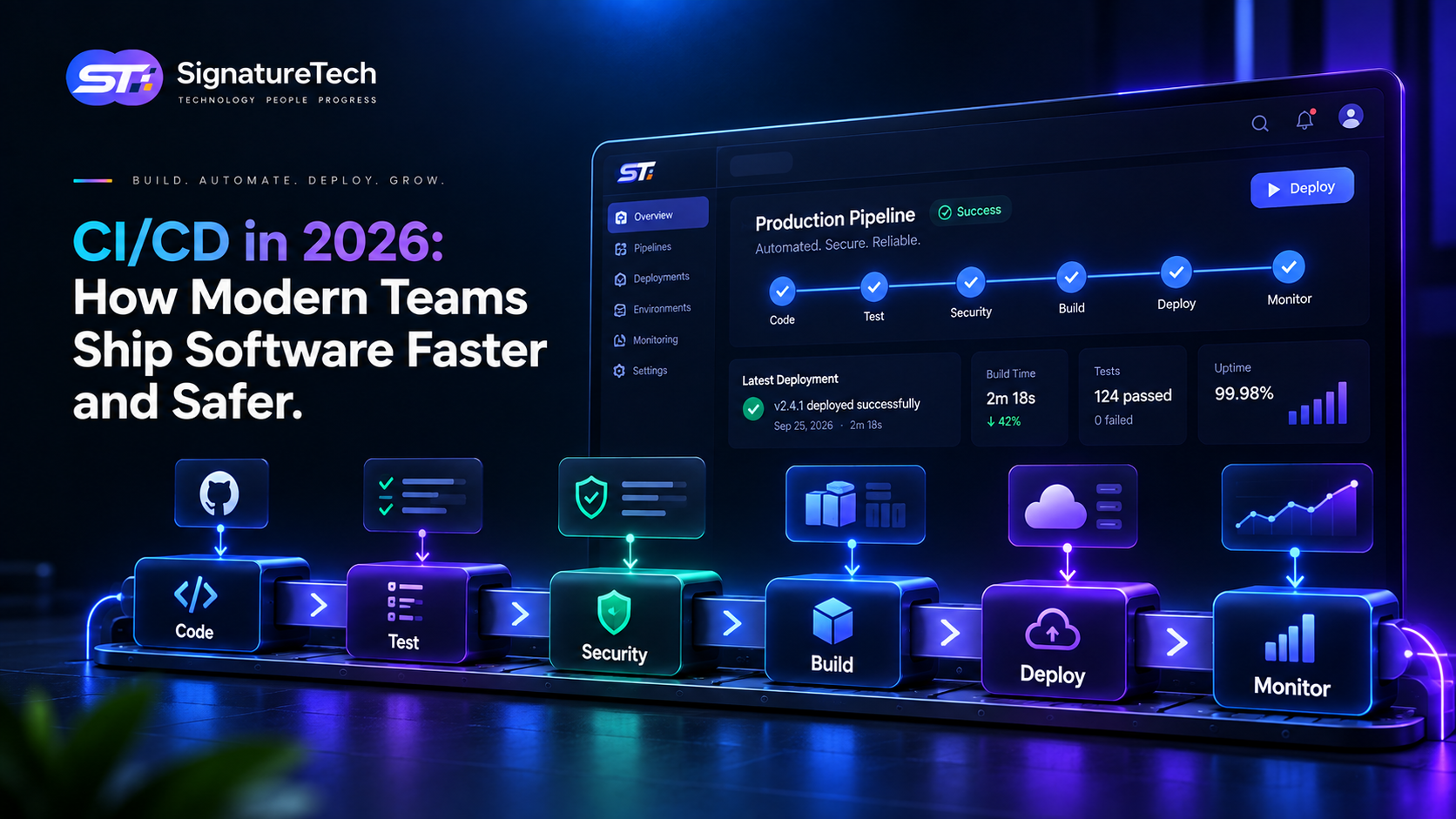
The basic workflow looks like:
Developer
    ↓
Git Commit
    ↓
Pull Request
    ↓
Automated Checks
    ↓
Tests
    ↓
Security Scan
    ↓
Build
    ↓
Deploy
    ↓
Monitor
Why CI/CD Matters More in 2026
Modern applications are increasingly complex.
A single SaaS product may include:
- Next.js frontend
- Node.js or NestJS backend
- PostgreSQL
- Redis
- Object storage
- APIs
- Background workers
- AI services
- Third-party integrations
- Cloud infrastructure
- Multiple environments
Manually deploying such systems is inefficient and risky.
CI/CD creates a consistent path from code change to production.
Instead of relying on:
"I think everything is ready."
the team can rely on:
"The pipeline verified it."
CI/CD Is More Than Automatic Deployment
A common misconception is:
CI/CD = push code → automatically deploy
That's incomplete.
A mature pipeline should provide multiple quality gates.
For example:
Code
 ↓
Lint
 ↓
Type Check
 ↓
Unit Tests
 ↓
Integration Tests
 ↓
Security Scan
 ↓
Build
 ↓
Deploy Staging
 ↓
Smoke Tests
 ↓
Production
 ↓
Monitoring
Each stage reduces a different type of risk.
1. Continuous Integration
Continuous Integration encourages developers to integrate changes frequently instead of maintaining large, long-lived branches.
A typical workflow is:
Feature Branch
      ↓
Pull Request
      ↓
CI Pipeline
      ↓
Tests + Quality Checks
      ↓
Code Review
      ↓
Merge
The advantage is simple:
Problems are discovered closer to when they are introduced.
This is generally much easier than discovering a major integration problem weeks later.
2. Automated Testing
Automated tests are one of the most important parts of a CI/CD pipeline.
Different tests serve different purposes.
Unit Tests
Test individual functions or components.
Integration Tests
Verify that multiple components work together.
API Tests
Validate backend endpoints and business logic.
End-to-End Tests
Simulate important user workflows.
For example:
Login
 ↓
Create Project
 ↓
Add User
 ↓
Generate Report
 ↓
Logout
Not every application needs thousands of end-to-end tests.
The better strategy is to automate the workflows where failure would have the greatest business impact.
3. Type Checking and Code Quality
Before deployment, the pipeline should catch problems that don't require running the full application.
Examples include:
- TypeScript errors
- Linting issues
- Formatting problems
- Unused code
- Dependency issues
- Build errors
For a TypeScript application, a pipeline might run:
npm install
npm run lint
npm run typecheck
npm test
npm run build
These checks are inexpensive compared with discovering the same problem after deployment.
4. Security in the CI/CD Pipeline
Security shouldn't be a separate activity performed only before launch.
Modern pipelines can incorporate security checks directly into software delivery.
Examples include:
- Dependency vulnerability scanning
- Secret detection
- Static application security testing
- Container image scanning
- Infrastructure configuration scanning
- License checks
A simplified DevSecOps workflow becomes:
Code
 ↓
Test
 ↓
Security Scan
 ↓
Build
 ↓
Deploy
This helps move security closer to the development process.
5. Environment Management
A professional CI/CD setup typically separates environments.
For example:
Development
     ↓
Staging
     ↓
Production
Each environment can have different:
- Databases
- API keys
- Configuration
- Domains
- Infrastructure
- Feature flags
This reduces the risk of testing new code against production resources.
It also gives teams an environment where they can validate releases before exposing them to customers.
6. Infrastructure as Code
Modern CI/CD works particularly well with Infrastructure as Code.
Instead of manually configuring servers, infrastructure can be represented as code.
Examples include:
- Terraform
- AWS CloudFormation
- Pulumi
- Kubernetes manifests
This makes infrastructure:
Version-controlled + Repeatable + Reviewable
For example:
Infrastructure Code
       ↓
Review
       ↓
CI Validation
       ↓
Infrastructure Deployment
If something changes, the team can review exactly what changed.
7. Containerized Deployments
Containers make applications easier to package consistently.
A typical workflow might look like:
Git Push
   ↓
Build Docker Image
   ↓
Run Tests
   ↓
Security Scan
   ↓
Push Image to Registry
   ↓
Deploy
The same application artifact can then move through environments.
For example:
GitHub
   ↓
GitHub Actions
   ↓
GHCR / Container Registry
   ↓
Staging
   ↓
Production
This reduces the classic:
"It works on my machine."
problem.
8. Deployment Strategies Matter
Not every production deployment should immediately replace the entire application.
Modern teams can use different deployment strategies.
Rolling Deployment
Gradually replace old instances with new ones.
Blue-Green Deployment
Maintain two environments and switch traffic between them.
Blue → Current Production

Green → New Version

        ↓

Traffic Switch

        ↓

Green → Production
Canary Deployment
Release the new version to a small percentage of users first.
95% → Version A
5%  → Version B
If metrics remain healthy, gradually increase traffic.
This can reduce the impact of unexpected production problems.
9. Feature Flags
Deployment and feature release don't always have to happen at the same time.
With feature flags, code can be deployed while functionality remains disabled.
For example:
Application deployed
       ↓
Feature flag OFF
       ↓
Internal testing
       ↓
Feature flag ON
       ↓
Small user group
       ↓
Full rollout
This separates:
Technical deployment
from:
Product release
That distinction gives product and engineering teams much more control.
10. Observability After Deployment
A deployment isn't successful simply because the pipeline says:
Deployment completed.
You also need to know whether the application is actually healthy.
Monitor metrics such as:
- Error rate
- Response time
- CPU usage
- Memory usage
- Database performance
- Queue processing
- API failures
- User activity
- Business-critical transactions
A useful production loop is:
Deploy
 ↓
Observe
 ↓
Detect
 ↓
Respond
 ↓
Improve
CI/CD without observability is incomplete.
CI/CD and AI in 2026
AI is increasingly being used inside software development workflows.
Teams can use AI-assisted tools for:
- Code generation
- Test generation
- Code review assistance
- Dependency analysis
- Documentation
- Log analysis
- Incident investigation
But AI should not automatically become an unrestricted deployment authority.
For production systems, a better model is:
AI Assistance
     ↓
Automated Validation
     ↓
Policy Checks
     ↓
Human / Automated Approval
     ↓
Deployment
High-risk production changes should have appropriate safeguards.
CI/CD for SaaS Companies
CI/CD becomes particularly valuable for SaaS products because SaaS businesses continuously evolve.
A SaaS product may deploy:
- Bug fixes
- UI improvements
- API changes
- Database migrations
- New integrations
- Security patches
- Performance improvements
- AI features
If every release requires extensive manual work, engineering velocity eventually becomes constrained by the deployment process.
A strong pipeline allows teams to spend more time building product functionality and less time coordinating deployments.
Database Migrations Need Special Attention
One area that shouldn't be treated like ordinary application deployment is the database.
A release might contain:
Application Change
+
Database Migration
A poorly designed migration can cause:
- Downtime
- Data loss
- Locking
- Application incompatibility
- Failed rollbacks
A safer approach is often to use backward-compatible migration strategies.
For example:
Deploy compatible schema
        ↓
Deploy application
        ↓
Migrate data
        ↓
Switch application behavior
        ↓
Remove old schema later
Database changes should be treated as a first-class part of the deployment strategy.
What a Good CI/CD Pipeline Looks Like
For a modern SaaS application, a practical pipeline could look like:
Developer Push
      ↓
Pull Request
      ↓
Lint
      ↓
Type Check
      ↓
Unit Tests
      ↓
Integration Tests
      ↓
Security Scan
      ↓
Build
      ↓
Container Image
      ↓
Staging Deployment
      ↓
Smoke Tests
      ↓
Approval
      ↓
Production Deployment
      ↓
Health Checks
      ↓
Monitoring
The exact pipeline should depend on the application's architecture and risk profile.
More automation isn't automatically better.
Useful automation is better.
Common CI/CD Mistakes
Even teams with CI/CD can make mistakes.
1. Deploying Without Automated Tests
Automation without validation simply automates failure faster.
2. Using Production Credentials Everywhere
Each environment should have appropriate credentials and permissions.
3. Ignoring Database Migrations
Application deployment and database changes must be coordinated.
4. No Rollback Strategy
Every production deployment should have a recovery plan.
5. No Monitoring
You can't reliably operate what you can't observe.
6. Extremely Long Pipelines
If CI takes an hour for every small change, developers will eventually try to bypass it.
7. Too Much Manual Approval
Automation should remove unnecessary bottlenecks.
8. Giving CI/CD Excessive Permissions
Pipeline credentials should follow the principle of least privilege.
How to Build a Better CI/CD Pipeline
Start simple.
You don't need a massive DevOps platform on day one.
A small SaaS team could begin with:
Stage 1
Code quality
- Lint
- Type check
Stage 2
Testing
- Unit tests
- Integration tests
Stage 3
Security
- Secret scanning
- Dependency scanning
Stage 4
Build
- Application build
- Docker image
Stage 5
Deployment
- Staging
- Production
Stage 6
Operations
- Health checks
- Logs
- Error monitoring
Then improve the pipeline as the product and team grow.
The Real Goal of CI/CD
The objective isn't to achieve:
"100 deployments per day."
Deployment frequency is only one metric.
A good delivery system should improve several dimensions:
- Deployment frequency
- Lead time for changes
- Change failure rate
- Recovery time
- Developer productivity
- Release confidence
The ideal outcome is:
Small changes, validated automatically, released frequently, and recovered quickly when something goes wrong.
Final Thoughts
CI/CD in 2026 isn't simply about automatically pushing code to production.
It's about creating a reliable software delivery system.
A mature pipeline combines:
Version Control
→ Automated Testing
→ Security
→ Build Automation
→ Infrastructure
→ Deployment
→ Observability
→ Fast Recovery
For startups and growing SaaS companies, this doesn't require an enormous DevOps team.
Start with a simple, repeatable pipeline and evolve it as the product becomes more complex.
At SignatureTech, we build CI/CD into the engineering process so development teams can move quickly without sacrificing reliability, security, or operational control.
Because shipping faster isn't enough.
The goal is to ship faster with confidence.